
I didn’t realize how much of my life was packed into one wallet until the day I thought I had lost it.
It happened on a normal, rushed morning. I stopped at a grocery store self-checkout, paid for a few things, grabbed my bags, and hurried back to my car. Twenty minutes later, I reached for my wallet at a gas station.
Nothing.
I checked my jacket. Nothing. Center console? Nothing. Passenger seat? Still nothing.
That awful panic hit instantly.
My driver’s license, debit card, credit cards, health insurance card, and personal information were all inside. I wasn’t just worried about losing cash. I was worried about canceling cards, replacing my ID, and dealing with identity theft headaches.
Thankfully, someone honest turned it in at customer service. But the stress stayed with me.
That night, I started looking for a better way to track my wallet. I had tried bulky trackers before, but they never felt right in a slim wallet. Then I found SmartCard by KeySmart, a thin credit-card-style tracker that works with Apple Find My.
I was skeptical at first. But after my 30-day SmartCard test, I can honestly say this is one of those small gadgets I now wish I had bought sooner.
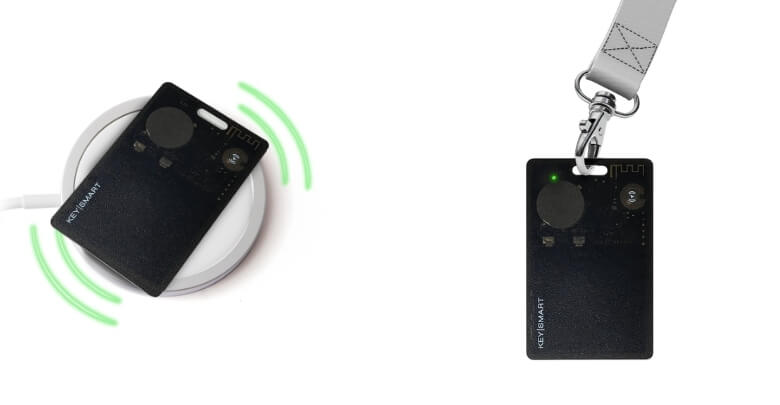
SmartCard is a thin tracking device that I came across after losing my wallet one too many times. It looks just like a credit card, and it’s thin enough to slip into any wallet without making it bulky.
- It’s a GPS Tracker in a Card Format
- Incredibly Slim and Lightweight
- Loud Sound Helps Me Find It Fast
- No subscription fees, just a one-time purchase.
- Only works with Apple devices, which isn’t great for Android users.
My Quick SmartCard Verdict
SmartCard is worth considering if you use an iPhone and want a thin, rechargeable wallet tracker that works with Apple Find My. It is best for wallets, ID holders, bags, luggage, and travel pouches, but it is not ideal for Android users or people who need real-time cellular GPS tracking.
For me, SmartCard solved a simple but stressful problem: not knowing where my wallet is when I need it most. It is slim, reusable, easy to set up, and more wallet-friendly than bulky round trackers.
What Is SmartCard?
SmartCard is a slim, credit-card-shaped tracker designed to help Apple users locate wallets, bags, luggage, ID cards, laptop bags, jackets, cameras, and other valuables. It works with Apple Find My, includes a loud ring, supports wireless charging, and fits inside wallets without bulky attachments.
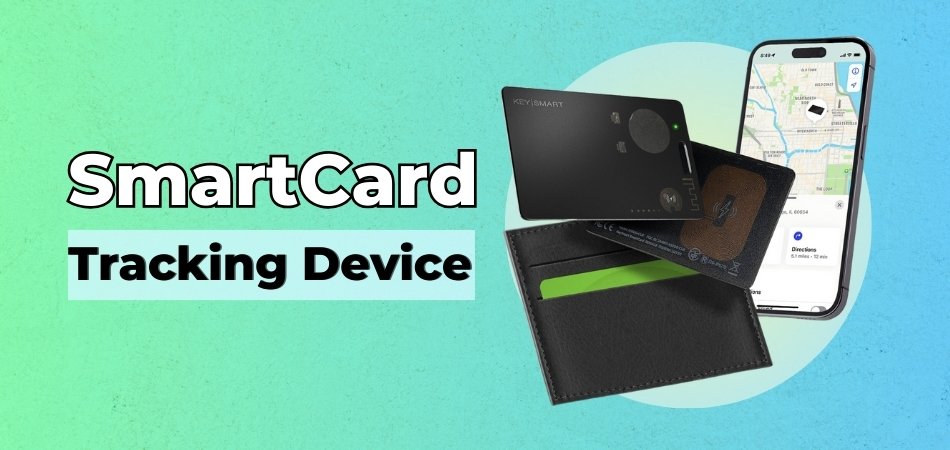
SmartCard is basically a wallet tracker built for people who hate bulky trackers.
Instead of clipping a plastic tag to your keys or stuffing a chunky device into your wallet, SmartCard slides into a card slot like a regular credit card. It is listed as thinner than 2mm, making it one of the slimmest tracker cards I’ve seen.
You can use it to track:
- Wallets
- Bags
- Luggage
- ID card holders
- Jackets
- Laptop bags
- Cameras
- Travel pouches
- Passport holders
- Glove-box pouches or gear bags, when placed securely
What makes it especially useful for iPhone users is that it works with Apple’s Find My app. That means no random third-party tracking app, no confusing setup, and no monthly subscription.
Why I Decided to Try SmartCard
I decided to try SmartCard because losing a wallet is not a small inconvenience. It can ruin your entire week.
After my grocery store scare, I kept thinking about what would have happened if I had lost my wallet at an airport, hotel, rideshare, or restaurant in another state. Replacing a driver’s license at home is annoying. Losing your wallet while traveling is a nightmare.
I had used traditional Bluetooth trackers before, but they were shaped more like key fobs. They worked fine for keys, but they made my wallet feel uneven and bulky.
SmartCard felt different because it solved the biggest problem: it actually fits inside a wallet.
I wanted to know if it could answer a few practical questions:
- Would it feel bulky in my wallet?
- Would Apple Find My setup be easy?
- Would the ring be loud enough to help?
- Would wireless charging feel convenient?
- Would I still use it after the novelty wore off?
After 30 days, I had my answer.
How Does SmartCard Work?
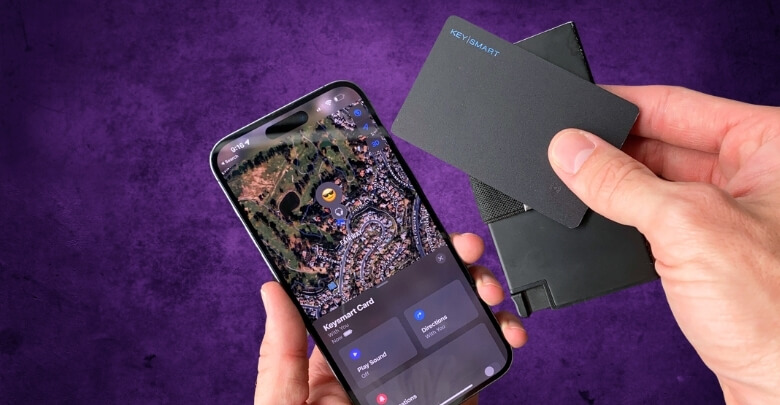
SmartCard works by connecting to Apple Find My, so you can locate your wallet or valuable item from your iPhone. Once paired, you can view its location on a map, make it ring nearby, receive alerts, and use Find My features if the item goes missing.
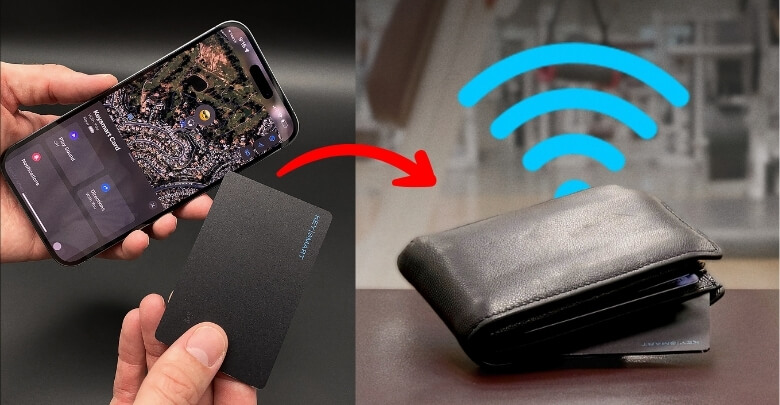
The setup was simple.
Here’s how it works:
- Slide SmartCard into your wallet, bag, luggage, or pouch.
- Open the Apple Find My app.
- Go to Items.
- Tap Add Item.
- Pair SmartCard.
- Name it something like “Wallet,” “Backpack,” “Luggage,” or “Passport.”
- Start tracking it from your phone.
Once connected, you can use your iPhone to:
- Locate it on the map
- Make SmartCard ring
- Check the last known location
- Get alerts if you leave it behind
- Use Lost Mode through Apple Find My
The product information highlights a 200-foot Bluetooth range, which is useful when the item is nearby but hidden under cushions, inside a bag, or somewhere around the house.
One important note: SmartCard is not a standalone cellular GPS tracker with its own monthly data plan. It works through Bluetooth and Apple Find My. That is also why there is no monthly subscription fee.
My 30-Day SmartCard Test: What Happened in Real Life
During my 30-day SmartCard test, I used it as a normal person would.
I placed it in my wallet first. Then I tested it in my backpack, jacket pocket, travel pouch, car console, and luggage pocket.
Inside My Wallet
This was the biggest test.
SmartCard felt like carrying one extra card. It did not create the annoying bulge I’ve had with other trackers. Since it is thinner than 2mm and designed like a credit card, it fits naturally inside a wallet.
That alone makes it more practical than an AirTag-style tracker for wallet use.
Finding My Wallet at Home
A few days into testing, I couldn’t find my wallet before leaving the house.
I opened Find My and made the SmartCard ring.
The wallet was wedged between the couch cushion and the armrest. Without the ring, I probably would have wasted another 10 minutes tearing the room apart.
SmartCard is listed with a 75dB speaker, which explains why the ring felt useful indoors.
Testing It in a Backpack and Travel Pouch
I also tried SmartCard in my backpack and travel pouch. This made a lot of sense because I often carry my laptop, charger, notebook, wallet, and personal documents together.
For travel, I can see SmartCard being especially useful inside:
- Passport holders
- Carry-on bags
- Luggage pockets
- Laptop backpacks
- Camera bags
- Travel wallets
- Document organizers
Losing a wallet is bad. Losing a passport holder while traveling is even worse.
Wireless Charging
One of my favorite features is that the SmartCard is wirelessly rechargeable.
The product information says it can last up to 5 months on a single charge, which is a major upgrade over trackers that feel disposable once the battery dies.
I like that I don’t have to throw it away when the battery runs out. I can simply recharge it and keep using it.
Key Features of SmartCard
During my testing, I found that SmartCard isn’t just designed to help you locate a misplaced wallet—it also focuses on convenience, portability, and ease of use. Here’s a closer look at the key features that stood out and how they performed in everyday situations.
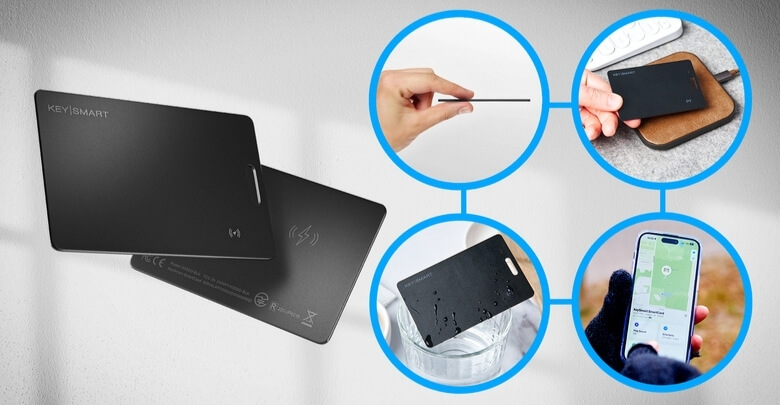
Slimmest Card Tracker Design
SmartCard is listed as thinner than 2mm, with dimensions around 2.12 x 3.33 inches and a weight of about 11g.
That makes it close to credit-card size and easy to carry in wallets, cardholders, passport sleeves, ID holders, bag pockets, and laptop cases.
This is the feature that makes SmartCard stand out the most.
Apple Find My Compatibility
SmartCard works with Apple Find My, which means iPhone users can track it from an app they already know.
No extra tracking app. No confusing setup. No subscription wall.
Locate It on the Map
You can open Find My and see where your SmartCard was last located.
This is useful if you left your wallet at work, forgot a bag at a friend’s house, or want to check whether your luggage or travel pouch is nearby.
Loud Ring
SmartCard includes a built-in speaker rated at 75dB.
That is helpful when your wallet is nearby but hidden. During my test, this was the feature I used most at home.
200-Foot Range
SmartCard has a listed 200-foot Bluetooth range.
That gives you useful nearby tracking coverage in your home, office, car area, hotel room, or other close-range situations.
Wireless Rechargeable Battery
SmartCard is rechargeable and can last up to 5 months on a single charge, depending on usage.
This is a major benefit because it is reusable instead of disposable.
IPX8 Water-Resistant Build
SmartCard is listed as IPX8 water-resistant, which gives extra peace of mind for spills, splashes, rain, and everyday accidents.
I would not intentionally abuse it, but for a wallet or bag tracker, water resistance matters.
Lanyard Slot
One detail I liked is the lanyard slot.
That means SmartCard is not limited to wallets. You can attach it to an ID card, badge holder, bag strap, camera case, or other gear where a card slot is not available.
No Monthly Subscription
SmartCard does not require a monthly subscription.
That is a big deal. I already pay for enough apps and services. A wallet tracker should not become another recurring bill.
See Current SmartCard Bundle Deals
SmartCard Pros and Cons
Every product has strengths and trade-offs. To help you make an informed decision, here’s a quick overview of what SmartCard does well, where it falls short, and who is most likely to benefit from using it.
Pros
- Slim credit-card-style design
- Thinner than 2mm
- Works with Apple Find My
- No monthly subscription
- Wireless charging
- Battery lasts up to 5 months per charge
- Loud 75dB ring
- 200-foot Bluetooth range
- IPX8 water-resistant build
- Lanyard slot for ID cards, bags, and gear
- Fits wallets better than AirTag-style trackers
- Useful for luggage, backpacks, jackets, cameras, and travel pouches
Cons
- Needs occasional charging
- Ring may be harder to hear in very loud places
- Find My performance depends on Apple’s network and nearby devices
My honest take? The pros easily outweigh the cons if you use an iPhone and want a slim wallet tracker.
SmartCard vs. AirTag
SmartCard is not trying to replace every type of tracker. But for wallets, it has one obvious advantage over AirTag: shape.
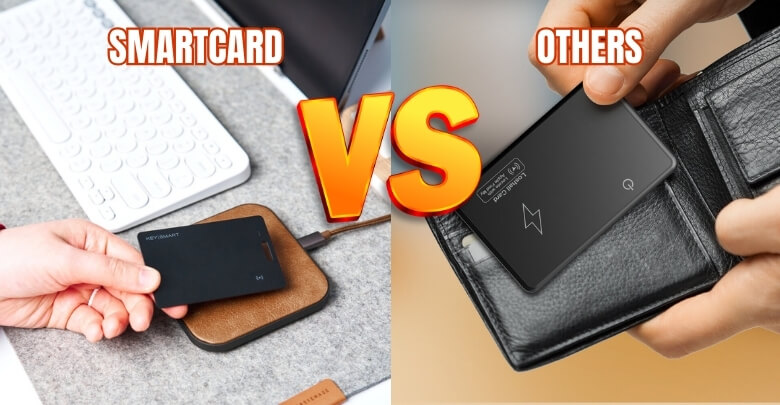
To be clear, AirTag is still excellent for keys, backpacks, and general item tracking. But SmartCard’s flat shape makes it more practical, specifically for wallets, ID holders, passport sleeves, and card-style compartments.
| Feature | SmartCard | AirTag |
| Rechargeable | Yes | No |
| Dimensions | 2.12 x 3.33 in | 1.26 x 1.26 in |
| Thickness | 0.063 in | 0.3 in |
| Speaker | 75dB | 60dB |
| Weight | 11g | 11g |
| Fits wallets easily | Yes | No, not without bulk |
| Apple Find My support | Yes | Yes |
AirTag is great for keys, backpacks, and luggage. But in a slim wallet, it can feel bulky.
SmartCard is better for wallets, ID holders, passport holders, and flat compartments because it was designed in a card shape from the start.
Who Should Buy SmartCard?
SmartCard is best for iPhone users who want a slim, rechargeable, no-subscription tracker for wallets, bags, luggage, ID cards, jackets, cameras, laptops, and travel essentials. It is especially useful for busy professionals, travelers, students, parents, and anyone who misplaces valuables.
SmartCard makes the most sense for:
- iPhone users
- Frequent travelers
- Busy professionals
- Parents
- Students
- Commuters
- People who carry ID cards or badges
- People who often misplace wallets
- Anyone worried about losing personal documents
- People who want a flatter AirTag alternative for wallets
If losing your wallet, bag, or passport holder would stress you out, SmartCard is worth considering.
Who Should Not Buy SmartCard?
SmartCard may not be right for everyone.
You may want to skip it if:
- You use Android
- You want live cellular GPS tracking
- You never carry a wallet, bag, or ID holder
- You dislike rechargeable devices
- You expect it to physically prevent theft
SmartCard is a tracking tool, not a security guard. It helps you locate and react faster, but it cannot stop someone from stealing your wallet.
It can also be placed in a gear bag, glove-box pouch, camera case, or secured accessory compartment, though it is not a replacement for a dedicated vehicle or bike GPS tracker.
SmartCard for Travel: Is It Useful?
Yes, SmartCard is useful for travel because it can fit inside luggage, passport holders, wallets, backpacks, carry-ons, and travel pouches. It helps Apple users locate items, make them ring nearby, and check location through Apple Find My without adding bulk.
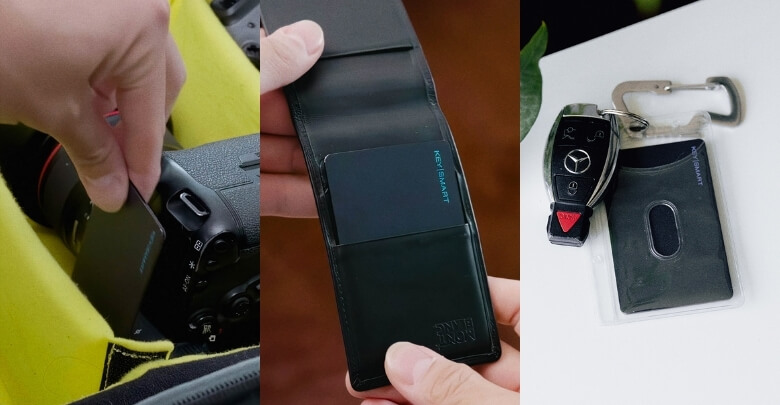
Travel is one of the best reasons to own a SmartCard.
Airports, hotels, rideshares, restaurants, and rental cars are all places where small valuables get lost. A slim tracker can save a lot of stress.
I would use SmartCard in:
- Carry-on luggage
- Checked bags
- Passport holders
- Travel wallets
- Laptop bags
- Camera bags
- Road trip bags
- Cruise luggage
A lost wallet is frustrating. A lost passport holder during a trip can derail your entire itinerary.
SmartCard gives you a simple backup plan.
Is SmartCard Safe and Private?
SmartCard works through Apple Find My, which is designed with privacy-focused location features. It helps you track your own belongings, such as your wallet, bag, luggage, ID card, or travel pouch, but it should not be used to track someone else without consent.
Privacy matters with any tracking device.
That was one of my first concerns before trying SmartCard. I wanted help finding my wallet, but I did not want a random gadget constantly exposing my personal location or forcing me into an unfamiliar app ecosystem.
Because SmartCard works through Apple Find My, the experience feels more familiar and controlled for iPhone users.
SmartCard does not directly prevent identity theft. But it can help you realize sooner that your wallet or ID holder is missing, which may help you react faster by retracing your steps, freezing cards, or contacting the place where you left it.
SmartCard Pricing and Discounts
SmartCard pricing may vary depending on current promotions, but the reviewed offer listed one SmartCard at $34.95, with larger bundle deals available for people who want to track multiple wallets, bags, luggage pieces, or family items.
Here were the listed package options at the time of review:
| Package | Listed Price | Best For |
| 1 SmartCard | $34.95 | One wallet or ID holder |
| Buy 2, Get 1 Free | $89.90 | Wallet + bag + travel pouch |
| Buy 3, Get 2 Free | $134.85 | Families or frequent travelers |
The bundle deals make sense if you want to track more than one item.
For example:
- One in your wallet
- One in your passport holder
- One in your laptop bag
- One in your child’s backpack
- One in your luggage
SmartCard also stands out because it does not require a monthly subscription.
Since online discounts and bundle offers can change, I recommend checking the official SmartCard website for the most current price before ordering.
Where to Buy SmartCard
The safest place to buy SmartCard is through the official website, where you can check current discounts, bundle offers, availability, guarantee details, and payment options. Buying from the official source also helps avoid knockoffs or unsupported third-party sellers.
I would avoid random marketplace listings unless you are sure the seller is legitimate.
With a tracker, authenticity matters. A cheap lookalike may not work properly with Apple Find My, may not have the same battery life, may lack IPX8 water resistance, or may not include support.
The official website is the best place to check:
- Current pricing
- Bundle deals
- Stock status
- Warranty or guarantee details
- Payment options
- Product specifications
Is SmartCard Worth It?
Yes, SmartCard is worth it for iPhone users who want a slim, rechargeable wallet tracker that works with Apple Find My and does not require a subscription. It is especially valuable for people who travel, misplace wallets, carry ID cards, or want a flatter AirTag alternative.
After 30 days, SmartCard earned a permanent spot in my wallet.
It is not flashy, and that is part of why I like it. It does not make unrealistic promises. It simply solves a real, everyday problem.
I like it because:
- It fits naturally in my wallet
- It works with Apple Find My
- It rings loudly enough for nearby searches
- It lasts up to 5 months per charge
- It recharges wirelessly
- It is IPX8 water-resistant
- It has no monthly fee
- It can also track bags, luggage, ID cards, jackets, and cameras
For me, the biggest value is peace of mind.
I hope I never desperately need it. But if my wallet disappears again, I would rather open Find My than panic and retrace my entire day from memory.
Final Verdict: My Honest SmartCard Review
My honest verdict is simple: SmartCard is one of the most practical everyday gadgets for Apple users who want a slim wallet tracker without monthly fees.
It is not perfect. Android users are left out, and it is not a standalone cellular GPS device. You also need to recharge it occasionally.
But for iPhone users, SmartCard gets a lot right.
It is thin, rechargeable, IPX8 water-resistant, loud enough for nearby searches, and compatible with Apple Find My. It can track more than just wallets, too. The lanyard slot and flat design make it useful for ID cards, bags, luggage, laptops, jackets, cameras, and travel gear.
After nearly losing my wallet once, I do not want to go back to having no backup plan.
SmartCard gives me that backup plan in the simplest way possible.
Frequently Asked Questions About SmartCard
Before buying a wallet tracker, it’s worth knowing how well it works in real life. Below, we’ve answered the most frequently asked questions about SmartCard, including how it connects to your phone, how accurate the tracking is, battery performance, and whether it’s a worthwhile investment for everyday peace of mind.
Does SmartCard work with Android?
No. SmartCard is designed for Apple users and works with Apple Find My. Android users should look for an Android-compatible tracker.
Can SmartCard help me find a lost wallet?
Yes. SmartCard can help you locate your wallet through Apple Find My, make it ring nearby, and check its last known location.
Is SmartCard a real GPS tracker?
SmartCard works through Bluetooth and Apple Find My. It is not a standalone cellular GPS tracker with a separate monthly service plan.
Is SmartCard waterproof?
SmartCard is listed as IPX8 water-resistant, which helps protect it from spills, splashes, rain, and everyday accidents. I would still avoid intentionally abusing it.
How loud is SmartCard?
SmartCard is listed with a 75dB speaker, which helps when locating nearby items.
Is SmartCard thicker than a credit card?
SmartCard is extremely slim and listed as thinner than 2mm, making it suitable for wallets and cardholders.
Can I use SmartCard in luggage?
Yes. SmartCard can be placed inside luggage, carry-ons, backpacks, travel pouches, and passport holders.
Can SmartCard track ID cards?
Yes. SmartCard includes a lanyard slot and can be used with ID cards, badge holders, and similar everyday items.
Is SmartCard better than AirTag for wallets?
For wallets, yes, SmartCard may be more practical because it is flat and card-shaped. AirTag is thicker and can make wallets bulky.
Can SmartCard prevent theft?
No. SmartCard cannot physically prevent theft. It helps you track, locate, and react faster if something goes missing.
SmartCard is a thin tracking device that I came across after losing my wallet one too many times. It looks just like a credit card, and it’s thin enough to slip into any wallet without making it bulky.
- It’s a GPS Tracker in a Card Format
- Incredibly Slim and Lightweight
- Loud Sound Helps Me Find It Fast
- No subscription fees, just a one-time purchase.
- Only works with Apple devices, which isn’t great for Android users.
